Graphic Designer & Illustrator
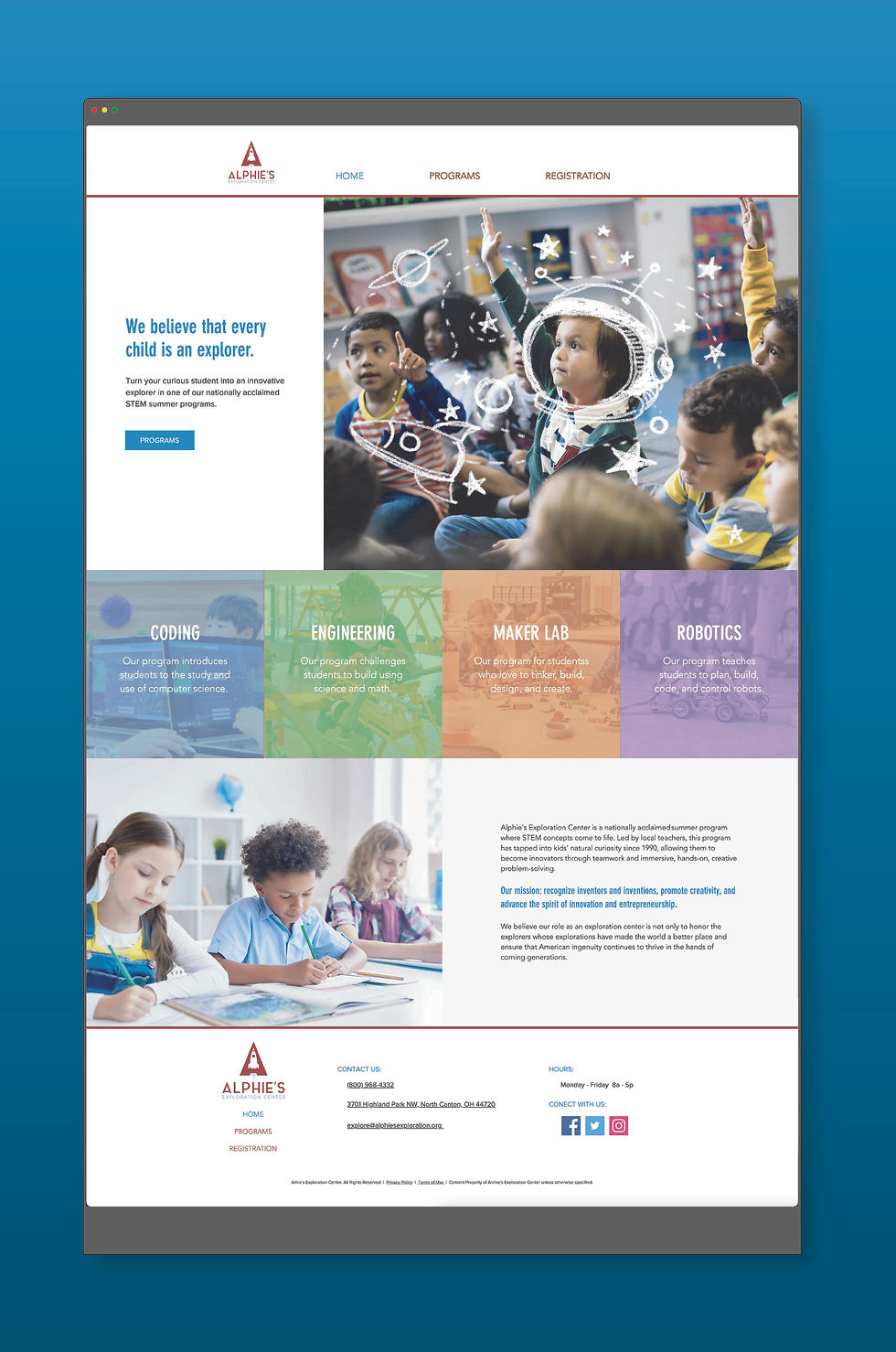


Summer Camp Website
Wix / Adobe Photoshop / Adobe Illustrator, 2020
Digital Media Production
For this Digital Media Production project, we were first tasked with designing a website for a summer camp program at an exploration center. Everyone was given the same assets to build the site with (images and logos), as well as a small text document outlining the two different camps in the program.
We were tasked with finding our audience, writing copy for the site, and building the final site.


Laying out Site
Wix
Directly in Wix, I began by creating the header and footer for the site. I wanted the location and contact information for the business to be accessible to the customer on every page of the website.
I then added three pages to the website, the Home page, About page, and Registration page, The Home page would give a quick synopsis of the summer programs, the About page would give some brief information on the organization and explain the STEM program, and the Registration would allow guardians to enroll their students into one of the two programs.
To fill the About page, I included the information provided with the design brief on the organization's history. I had to research and write my own copy to add information on the STEM program. The page ended up being copy-heavy. It needed something else to bring the page together.


Transforming the Images
Adobe Photoshop
In the asset folder, we were provided with, I found an image of a student raising their hand in the classroom. The image itself was very different from the rest. The student raising their hand was positioned in the center of the composition, and the rest of the class is out-of-focus. All of the other provided images were very flat and unengaging to the viewer.
I decided I wanted to use this image on the About page. I opened the image in Adobe Photoshop, intending to only crop out some of the out-of-focus students in the foreground. I thought the image could use something else to set it apart from the rest. I started sketching over the image with a white charcoal brush. Since the logo for the organization was space themed, I sketched some stars around the student, a rocket orbiting their head, and an alien helmet.
The Final Site
Wix.com
After completing the site, I presented it to "the client." After viewing all the pages together, it was clear that the About page was not only information-heavy but did not fit with the rest of the site. Feedback from the "client" was to move the About page image I sketched on in Photoshop to the Home page.


Back to the Drawing Board
Wix
Moving the "Spaceman" image to the Home page slideshow left the copy-heavy About page and the slideshow on the Home page unbalanced. The move highlighted just how stark the website was. The whole site needed more copy and more information for the consumer.
Starting with the Home page, I deleted the slideshow to make more room for the "Spaceman" image. I included a call to action on the side to drive users to the new Programs page (formerly the About page). At the bottom of the Home page, I added the organization history from the About page. I also added a four-column strip dividing the two sections that highlighted the courses students would participate in during the summer camp.
I redesigned the Programs page to highlight the differences between the two programs offered at the summer camp. I did not have copy provided to explain the differences between the two, so I wrote my own. I removed the slideshow format and made a strip for each program. I assigned a different color scheme to each program to help differentiate the two.
I redesigned the Registration page also. I wrote copy on this page highlighting the different price offerings and schedules for each program. On this page, I kept the slideshow format so guardians could easily see the differences between the two without scrolling away from the registration window.
In Conclusion
The final website is clean, organized, and achieves the goal of helping drive web traffic towards the active social accounts for the business. I think the area I was least successful in was capturing the feel that drew my attention to the business in the first place.
If this were work for a client and not an exercise for a class project, then I would have spent time photographing the location and some of the "oddities" that help make the store so special. Not having access to high-resolution images of the shop and relying solely on stock photographs hindered the design process.